The HyperDrive Pro Dashboard provides a quick overview of your dealership’s current fleet activity and performance. Dashboard tiles make it easy to identify open agreements, available vehicles, upcoming returns, potential conflicts, financial results, and other information requiring attention.
Accessing the HyperDrive Pro Dashboard- Log in to your Logitrac account.
- Select HyperDrive from the navigation bar at the top of the screen.
- Select Dashboard from the sidebar.
In HyperDrive Pro, the main HyperDrive sections are located in the sidebar instead of across the top of the page. However, HyperDrive can still be accessed using the HyperDrive button in the top navigation bar.
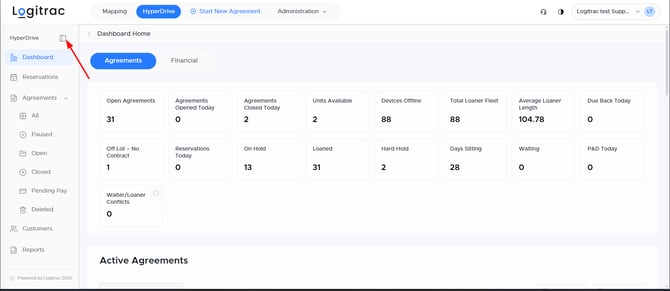
The Agreements tab displays tiles containing important information about your agreements and fleet. These tiles allow you to quickly review current activity and identify items that may require action.
The available tiles may include:
- Open Agreements: The total number of agreements currently open.
- Agreements Opened Today: Agreements created during the current day.
- Agreements Closed Today: Agreements closed during the current day.
- Units Available: Vehicles currently available for use.
- Devices Offline: Tracking devices that are currently reporting as offline.
- Total Loaner Fleet: The total number of vehicles in the dealership’s loaner fleet.
- Average Loaner Length: The average length of time vehicles remain on loan.
- Due Back Today: Agreements scheduled to be returned today.
- Off Lot, No Contract: Vehicles detected off the dealership lot without an active agreement.
- Reservations Today: Reservations scheduled for the current day.
- On Hold: Vehicles temporarily unavailable because they have been placed on hold.
- Loaned: Vehicles currently assigned to active agreements.
- Hard Hold: Vehicles placed on a hard hold and unavailable for assignment.
- Days Sitting: Information related to vehicles that have remained unused on the lot.
- Waiting: Vehicles or agreements currently in a waiting status.
- P&D Today: Pickup and delivery activity scheduled for the current day.
- Waiter/Loaner Conflicts: Customers marked as waiters in the dealership’s DMS who also have an active loaner agreement in Logitrac.
The Waiter/Loaner Conflicts tile is available to applicable DMS-integrated accounts. It helps identify situations where the repair order indicates that the customer is waiting at the dealership even though the customer currently has a loaner vehicle.
Select a tile to view the agreements or vehicles associated with that category. The detailed table below the tiles will update based on the selected tile and display the most current information available.
Viewing the Financial DashboardSelect the Financial tab at the top of the Dashboard Home page to view a snapshot of your dealership’s financial performance.
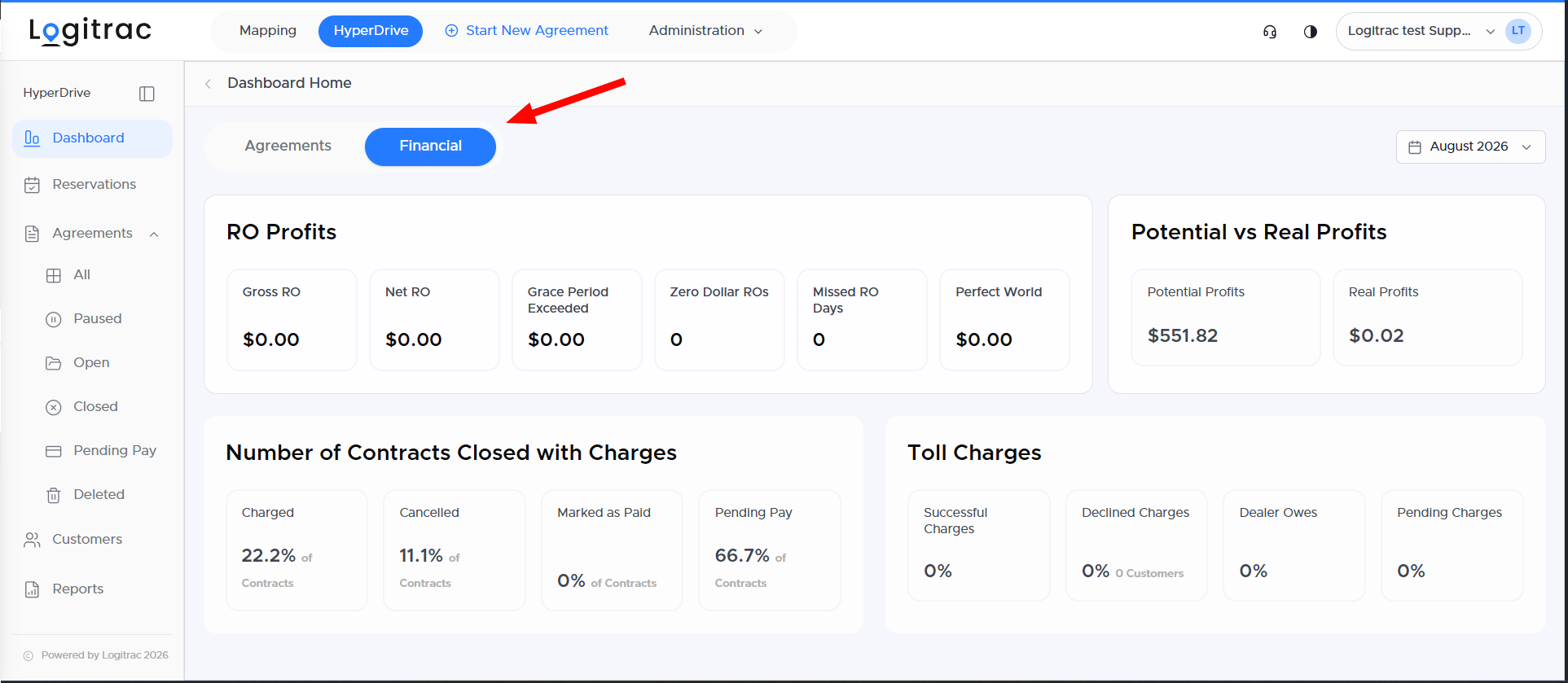
The Financial dashboard includes several groups of dealership metrics:
RO Profits
Review financial information associated with repair orders, including:
- Gross RO
- Net RO
- Grace Period Exceeded
- Zero Dollar ROs
- Missed RO Days
- Perfect World profit projections
Potential vs. Real Profits
Compare the revenue your dealership could have collected with the revenue that was actually collected during the selected period.
Contracts Closed with Charges
View the percentage of closed contracts by payment outcome, including:
- Charged
- Cancelled
- Marked as Paid
- Pending Pay
Toll Charges
Review a quick breakdown of toll activity, including:
- Successful Charges
- Declined Charges
- Dealer Owes
- Pending Charges
Use the date selector in the upper-right corner of the Financial dashboard to review information for the desired reporting period.
By regularly reviewing both the Agreements and Financial tabs, your team can monitor daily fleet activity, identify operational conflicts, track potential revenue, and respond quickly to items requiring attention.