Step 1: Start a New Agreement
-
Log in to your Logitrac dashboard.
-
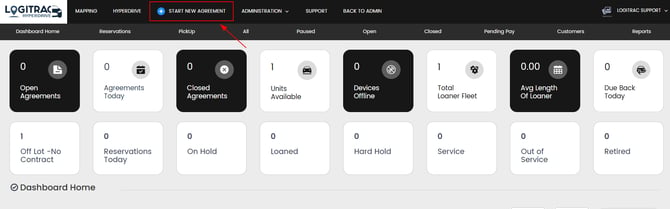
Click Start New Agreement.
Step 2: Send the Smart Link
-
In the new agreement screen, click the Smart Link button.
-
Enter the Customer’s First Name, Last Name, and Phone Number.
-
Click Send.


💡 This will generate and send a link to the customer, placing the agreement in a Paused status.
Step 3: Resume the Agreement and Edit Step 1
-
Return to the paused agreement.
-
Click Resume to begin editing.
-
In Step 1, fill out any available details:
-
You can backdate the agreement to reflect the original contract start date, or use the current date as the start point for the migration.
-

🔔 Note: You can skip sections like driver’s license, insurance, or payment details by clicking the bypass fields button *this button does require an admin password so we recommend changing the password to something easy so whoever is performing this action can do so to migrate the contracts*. The customer will update these when they access their Smart Link.
Step 4: Skip/Fill Remaining Steps
Step 2: Select the Vehicle
-
Choose the vehicle the customer is currently using.
Step 3: Skip Photos
-
Since the vehicle is not present, this step can be skipped.
Step 4: Placeholder Signature
-
Accept the terms and conditions.
-
Add a simple dot (.) or placeholder in the signature box to activate the agreement.

🔐 When the customer signs the agreement through the Smart Link, their real signature and information will automatically replace this placeholder.
Step 5: Finalize the Skeleton Contract
At this point:
-
A valid agreement skeleton exists within Logitrac.
-
The customer can now complete and sign the contract using their Smart Link.
✅ Once completed by the customer, all relevant information (license, insurance, credit card, real signature) will populate the contract.
Important Notes
-
If the customer does not complete their Smart Link, the agreement will remain incomplete and unsigned.
-
You should still have access to the original contract from your previous platform if needed if the customer never fully signs their new updated agreement within our platform.
Alternative Approach: Dual Platform Use
If you have access to both platforms during a transition period, you can take a more gradual approach:
-
Let contracts end naturally in your current system.
-
Start new agreements in Logitrac as customers return.
-
This method avoids immediate migration and reduces manual input.