-
Log In to Logitrac:
-
Navigate to the Logitrac login page and enter your credentials to access the platform.
-
-
Access the Administration Section:
-
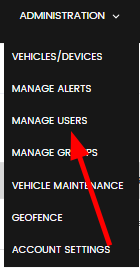
From the dashboard, locate and click on the Administration tab to enter the administrative settings.
-
-
Navigate to Manage Users:
-
In the Administration section, find and select Manage Users. This will open the user management page where you can see all current users.
-
-
Find the User:
-
Locate the user you wish to remove from the list of current users. You can use the search bar to quickly find the user by name or email.
-
-
Remove the User:
-
Click on the Delete button or icon next to the user’s details. A confirmation prompt will appear asking if you are sure you want to remove the user.

-
-
Confirm Removal:
-
Confirm the action by clicking Yes or Confirm on the prompt. The user will be removed from the system and will no longer have access to the Logitrac platform.
-

