- Log in to your Logitrac account.
- Select Mapping from the navigation bar at the top of the screen.
- Confirm that you are viewing the Track tab.
- Use the search field or vehicle list to locate the vehicle you want to retire.
You can search using available vehicle information such as the VIN or unit number.
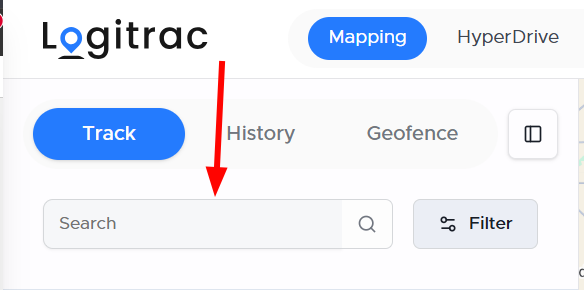
- Select the vehicle from the list or its corresponding icon on the map.
- Review the vehicle information to confirm that you have selected the correct unit.
- Open the vehicle’s details.
Before retiring the vehicle, verify identifying information such as the VIN, unit number, license plate, make, and model.
[Insert Image: Selected vehicle and vehicle details panel]
Changing the Vehicle Status- Select Edit from the vehicle details.
- Locate the Status field.
- Open the status dropdown.
- Select Retired.
- Select Save to apply the change.
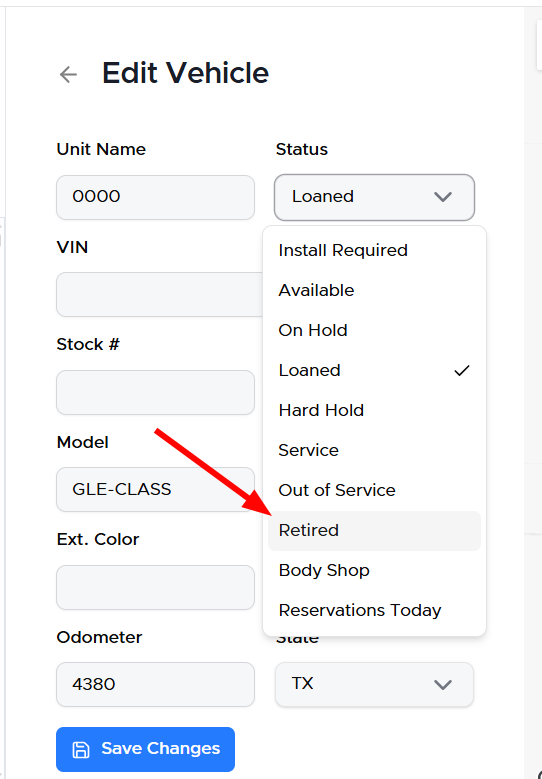
A confirmation message will appear after the vehicle has been successfully retired.
The vehicle will no longer appear as an active unit available for new agreements.
Viewing Retired VehiclesTo review a list of retired vehicles and their retirement dates:
- Open HyperDrive.
- Select Reports from the sidebar.
- Open the Historical Vehicle Log report.
The Historical Vehicle Log provides a record of vehicles that have been removed from active inventory.
Finding Previous AgreementsRetiring a vehicle does not remove its previous agreement history.
To locate agreements previously associated with a retired vehicle:
- Open HyperDrive.
- Expand Agreements in the sidebar.
- Select Closed or All.
- Search using the vehicle’s VIN, license plate, or vehicle ID.
This allows your dealership to preserve and access historical agreement information even though the vehicle is no longer part of the active fleet.